Look what arrived on our doorstep today! That's right -- the shiny, expensive new iMac that's now equipped with that funky custom and / or overclocked 3.06GHz CPU. Take a look at us wildly unboxing and handling the behemoth in the gallery below, and get a load of its fairly impressive Xbench scores after the break.
endgagdet
Showing posts with label Apple. Show all posts
Showing posts with label Apple. Show all posts
Wednesday, May 28, 2008
Apple iMac 3.06GHz unboxing, hands-on, and benchmarking


Tuesday, January 29, 2008
iPhone briefly becomes No. 1 Google user
Apple's smartphone muscles past models by veteran handset makers to take top spot, then settles into second place in rankings Despite its small share of the overall mobile phone market, the iPhone spiked to No. 1 on Dec. 25 among phones using Google's services, beating out mobile makers that have been selling smartphones for many years. Google revealed a chart showing that around the middle of November, iPhone users began to surpass BlackBerry customers in accessing Google, though they were still behind Symbian and Windows Mobile users. But on Dec. 25, iPhone users shot above them all, then quickly settled into the second-largest Google user base. By the end of September, the last quarter in which Apple reported numbers, Apple had sold more than 1.3 million iPhones. By comparison, Nokia has sold 50 million of its N-series line of phones, said Avi Greengart, an analyst at Current Analysis. At the end of December, there were 12 million subscribers using BlackBerry devices. "One thing this does is shows that Apple has done a remarkable job of publicizing some of these capabilities, even if they're not the first to bring the capability to market," Greengart said. Some of Google's mobile services, like Google Maps, were already available on mobile phones before the iPhone hit the market. Yet, clearly, iPhone customers are using the services more frequently. "Either because of the design or PR or brand, or in all possibility because of the implementation ... Apple has popularized the notion that you can do more on the phone than you might have tried to do previously," he said. iPhone customers will indeed be able to do more using Google services, with the updated offerings unveiled Monday. iPhone users can now customize Google services through the menu bar and iGoogle home page. When iPhone users visit Google.com, they can choose Google applications to appear as links in a menu bar that runs across the top of the page. Signing in once, users can then access a variety of Google services, including Gmail, Calendar, Reader, Docs, and Picasa. In addition, iPhone users can also visit their customized iGoogle page from their phones. iGoogle is a page that users can arrange to include widgets of their choosing, including news, weather, games, and recent Gmail messages. Other changes to Google's iPhone service include an updated user interface and a monthly view on the calendar. In addition, users won't have to hit refresh to see new e-mails in Gmail because Gmail will automatically show new messages. The new Google services for the iPhone keep pace with some new services that Yahoo introduced just last week. Yahoo began letting mobile users, including iPhone customers, choose widgets to arrange on their mobile Yahoo home pages. On its mobile Web site, Yahoo claims to offer the only e-mail service that pushes new messages to the iPhone as soon as they come in. The new mobile services from Yahoo and Google demonstrate the eagerness both companies have to win over mobile users. more information via infoworld
Google released an update to its offerings for the iPhone, hoping to continue a trend that recently saw the iPhone briefly become the No. 1 mobile phone hitting Google sites.
Friday, January 25, 2008
The Santa Rosa MacBook Pro
The Santa Rosa MacBook Pro, named for the Intel Core 2 Duo chip set used in the notebook, became available in June, but I wasn't prepared to issue a final judgment until now.
After six months of intensive, daily use of the machine, I can state now that today's MacBook Pro stands head and shoulders above Apple's prior flagship Intel notebooks, and sets a standard for performance, features, durability, eco-responsibility, and quality that any PC vendor will find difficult to approach for a similar price.
The Santa Rosa MacBook Pro has earned its stripes. If this notebook had a frequent flier account of its own, it would have racked up enough travel miles in my carry-on bag to qualify for Gold status. I figure that this is a fitting milestone for writing this review, because by this point, most notebooks, including some from Apple, would be showing their age. This machine looks, feels, and runs like it did when it came out of the box. Considering how sweet it was when new, that's saying something.
High points
Apple has transcended PC notebooks. The Santa Rosa MacBook Pro doesn't look or feel like any notebook you've ever driven, even if your present notebook is a Mac.
With its thick aluminum armor and unusually sturdy construction, MacBook Pro begs to be used in demanding conditions, like on a film set, in a photo studio, in a radiologist's lab, in an elite developer's lap, or in the field for on-site news edits and Webcasts. Considering all of this, the seat-back tray and the carry on bag pose little challenge.
The Magsafe power cable connector is no mere gimmick. It replaces the friction-fit barrel connector standard in other notebooks with a rectangular magnetic latch. You can't plug the Magsafe connector upside down, and you can unplug it in the most irresponsible of ways: by pulling on the cord.
With any notebook built to please professionals of all breeds, the display, keyboard and pointing device can outstrip many other criteria. Apple has always managed the trick of making the ultra-thin lid rigid; MacBook Pro's LCD panel doesn't show rainbows when you press on it from the front or the back, and this model flexes less than preceding Mac notebooks models have. The 15.4-inch, 1440-by-900 widescreen LCD panel (a 17-inch model is available) is bright and has high contrast. It's easy on your eyes for long periods of continuous work. The display is perfectly matched with OS X's font smoothing and switchable color profiles.
MacBook Pro's LED display, seen first in this Santa Rosa model, is remarkable in a number of ways. Unlike standard notebook displays' fluorescent backlighting, MacBook Pro's LED backlight is white; this notebook's display is capable of paper white. When you choose the glossy display, black shows not even the slightest hint of gray. The LED backlight consumes less power at lower brightness, which lends to MacBook Pro's battery life edge over PC models. Last but by no means least, the LED backlight cuts way back on the level of hazardous materials used in manufacturing. Lead is already out, and Apple's got mercury on the run.
via infoworld

Friday, January 18, 2008
Macbook Air the world's thinnest notebook
MacBook Air is ultrathin, ultraportable, and ultra unlike anything else. But you don’t lose inches and pounds overnight. It’s the result of rethinking conventions. Of multiple wireless innovations. And of breakthrough design. With MacBook Air, mobile computing suddenly has a new standard.
Design

Amazingly thin. Amazingly full-size.
The thinness of MacBook Air is stirring. But perhaps more impressive, there’s a full-size notebook encased in the 0.16 to 0.76 inch of sleek, sturdy anodized aluminum. And at just 3.0 pounds,1 MacBook Air is more than portable — it’s with you everywhere you go.
A no-compromise display.
The glossy 13.3-inch, widescreen LED backlit MacBook Air display is the same viewable size as the screen on MacBook. The 1280-by-800 resolution gives you vibrant images and rich colors at full brightness the moment you open MacBook Air. So you get full-screen performance with all the benefits of a slim design.
Full-size, full-feature keyboard.
The keyboard is full-size with crisp keys just like the ones on MacBook. But MacBook Air goes further by adding backlit key illumination, making it easy to work in low-light settings such as airplanes and conference halls. A built-in ambient light sensor automatically adjusts keyboard and display brightness for optimal visibility. And with the oversize multi-touch trackpad, it just keeps getting better for fingers.

Features:
The brilliance of multi-touch.
MacBook Air includes an oversize trackpad with multi-touch technology. You can pinch, swipe, or rotate to zoom in on text, advance through a photo album, or adjust an image. This gesture-based input so successful on iPhone and iPod touch now comes to MacBook.
A smart LED display.
The backlit LED display allows for an even thinner build. It provides instant full-screen brightness the moment you open MacBook Air. The mercury- and arsenic-free display is also more power efficient, which translates to longer battery life.
Thin is in the details.
The innovative now-you-see-it, now-you-don’t port hatch flips down to reveal (and closes to hide) all the ports you really need: a USB 2.0 port, a headphone jack, and a micro-DVI port that supports DVI, VGA, composite, and S-video output. Even the MagSafe power connection has been reconsidered and slimmed to fit MacBook AirSo thin yet so expansive.
MacBook Air comes with a way-more-than-generous 2GB of RAM built in — ample memory for working with your favorite applications. The 80GB hard drive provides plenty of storage space. And you have the option to upgrade to a 64GB solid-state drive, which has no moving parts for enhanced durability.Micro. Chip.
MacBook Air performance is as impressive as its form, thanks to its 1.6GHz or 1.8GHz Intel Core 2 Duo processor. This chip was custom-built to fit within the compact dimensions of MacBook Air.
Built-in iSight camera.
Unlike most other ultraportable notebooks, MacBook Air includes a built-in iSight camera. It’s so smartly integrated, you hardly notice it’s there. The iSight camera and iChat software make video chatting easy anywhere there’s a wireless network.The battery is slimmer.
The performance isn’t.
The MacBook Air battery is our thinnest ever, yet it doesn’t compromise power. You can access the web wirelessly for five full hours.Wireless:
Without wires, you’re free to go anywhere.
MacBook Air is the notebook that allows for a fully wireless lifestyle. It all starts with the fastest-available, next-generation 802.11n Wi-Fi and Bluetooth 2.1 + EDR built in. And that’s just the beginning of the unprecedented wireless capabilities of MacBook Air.
Thursday, January 17, 2008
Apple Insider Leaks Ultra-Portable Details

An Apple insider told Wired today that the company's new ultraportable, expected to be seen in public for the first time tomorrow, has an extremely thin profile and is shaped like a teardrop when closed — thicker at the top behind the screen, tapering at the bottom behind the keyboard.
"It's unbelievably thin," said the source.
The device is made of aluminum and glass, and uses the same design language as recent Apple consumer products: black on silver.
Sadly, we don’t have details on pricing, specs or availability. Expect reality to disagree with our photoshops.

Is this cable-free design the face of things to come? Our own Charlie Sorrel pointed out earlier today that the rumor mill hints of a new MacBook utterly devoid of cables. However, he wouldn't speculate on its physical dimensions. But now we've got the, uh, skinny on what this new ultra slim, ultra portable actually looks like thanks to one source who says they saw this device in the wild.
Steve Jobs is widely expected to reveal a new MacBook at Macworld on Tuesday morning, and with the rumored name being "MacBook Air."
Most people are expecting a conventional sub-notebook — a super-thin, lightweight laptop that ships without an optical CD/DVD drive. The MacBook Air may also dispense with a wired Ethernet port, according to rumor. It will be a purely wireless device, relying solely on Wi-Fi or other wireless technology for its connectivity — hence the "Air" moniker.
But the Air seems more like a ultra portable with a physical keyboard and multi-touch screen, according to our source (who we promised not to name but confirmed works at an Apple third-party vendor).
We'll see tomorrow.
via blog wired
Sunday, January 13, 2008
Sony’s Apple Remote Control
Is there any place for innovation when it comes to the design of remote controls? Apparently, there is. This Sony’s”apple” allows users to perform basic functions like changing channels, volume etc. with simple motion gestures (see image below). Once “apples” are placed on the bowl, the remote control is being recharged. Neither price nor production dates are known.


via (smashing magazine and techeblog)
Tuesday, January 8, 2008
The 20 Best iPhone and iPod touch Applications
Last week we showed you how to install third party apps on your iPhone or iPod touch, and since then a new firmware preview has leaked its way to the 'nets with saucy new features that—once released—may tempt you to abandon your jailbreak for the newly introduced features. Fact is, until the 1.1.3 firmware is successfully hacked by the resourceful iPhone hackers, you can still enjoy all of the features the update is bringing and more with your jailbroken iPhone. Today I'm taking a look at my 20 favorite (that's right, 20) third-party iPhone and iPod touch apps.

NOTE: Apologies for the gallery format on the screenshots, but I wanted to provide full-size screenshots (sometimes more than one) for every app. All of the applications below are available through Installer.app, which can be installed by jailbreaking your iPhone. For more details on each app, click through to the gallery page (again, sorry). Some of the apps will work perfectly on both the iPhone and iPod touch, while others are obviously a bit more iPhone-oriented. I've only tested these apps on the iPhone. Want to learn more about all things iPhone? Check out How to Do Everything with your iPhone, written by me and my pal Jason Chen from Gizmodo.
Apps that Cover Rumored 1.1.3 Features
In case you haven't seen it, here's a video highlighting the upcoming features in the 1.1.3 firmware release.First let's tackle the hot apps of the moment—those apps that can already bring you the features rumored to be in the 1.1.3 update. The major new features appear to be the faux-GPS in Google Maps, multi-recipient SMS, and re-ordering apps on the home screen. Two of the apps above have been covering those features for quite some time (Navizon for GPS and Customize for re-ordering apps), and the third, iSMS for mutli-recipient SMS, is a bit newer, but in addition to multi-recipient SMS, it offers quick-reply templates, emoticons, and a much more robust SMS management system. It does not currently offer MMS messaging, though there is an iPhone app (called SwirlyMMS) that is attempting the MMS road, though it's still a bit bumpy. MMS messages can be sent (though it requires a bit of setup), but so far not received.
 iSMS
iSMS Navizon GPS
 Customize
The only major new feature that's been discovered in the 1.1.3 update that isn't easily available through Installer is the new web clip feature that allows the user to bookmark a web page directly on the home screen. There are hacks around that accomplish this, but they're not the kind of no-brainer installations as the above three apps. The WebSearch app described below, however, is arguably a good deal more useful for what I need than the web clips, so I can happily do without for the time being.
Now that I've covered the 1.1.3 features (I'll include in these apps in the sections below by category as well), lets move onto my twenty favorite iPhone apps.
Communication
Below we've got a more robust SMS client, a multi-protocol IM app, and a simple utility that adds push email capabilities to IMAP accounts—including Gmail. iSMS
iSMS Apollo
 iMapIdle
Multimedia
The multimedia list is a big one, so I'll just highlight a few. You've got a Last.fm client and scrobbler for your iPod, a feature-rich camera app, and a real-time lyrics app that automagically sucks lyrics for your music from the cloud. Books
Books MobileScrobbler
 iFlix
iFlix CameraPro
 TuneWiki
Productivity
One of my favorites, the WebSearch app adds one-click search to any site, while Sketches is a great whiteboard tool and drawing pad. Sketches
 WebSearch
Utilities
There are obviously quite a few great iPhone utilities, so to highlight just a few: OpenSSH is what I used to tether my iPhone data plan to my laptop; DropCopy is great for sharing files between your phone or iPod and your desktop; Installer, obviously, is the app that makes all of this third-party app business so easy; Navizon does the faux-GPS for Google Maps; and Customize covers app re-ordering and just about any other customization you'd want to make to your little iPod or iPhone. OpenSSH
 iTrac
iTrac iPhoneHome
 iSpit
iSpit DropCopy
 Installer
 Navizon GPS
 Customize
Games
There are actually tons of games available on the iPhone at this point, but these three stand out as favorites because of their impressive use of the iPhone's animation engine or for just being plain addictive.Gallery Name
 NES
NES iSolitaire
 HuaRongDao
via lifehacker
Sunday, December 23, 2007
Apple to release Intel Silverthorne Mobile Devices
Apple Insider reports that Apple will adopt Intel's "Menlow" Mobile Internet Device (MID) platform featuring the new 45-nanometer (nm) "Silverthorne" chip in a big way.
The information is from the ever elusive 'people close to the matter'. The Apple MacWorld Expo is in a couple of weeks and of course Apple will show something new. It is just a question of what. A 3G iPhone, a new Apple UMPC?
Intel is very fond of the new Silverthorne chip, comparing its impact with the introduction of the 8088 CPU. This will be something to be seen.
More details on Apple Insider.

Wednesday, December 12, 2007
Platinum iPhone Anyone?
Well, we’ve all seen the insanely blinged out iPod shuffles and what not. Even a gold trimmed iPhone made its way around the net earlier this year.
Well the folks behind the gold iPhone are back, and this time they’re coming in Platinum.
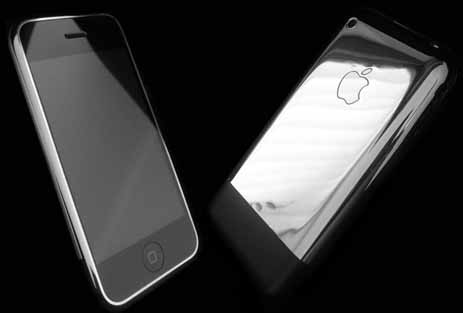
Looks kind of like a regular iPhone doesn’t it? Well - that slight change can be yours for only $2,230.
via applegazzete
Apple TV update planned; Next-gen iPhone in final phase; iPod ahead of expectations
"After meeting with key component suppliers and manufacturers in Asia, researchers for investment bank Goldman Sachs said this week they believe Apple will introduce two revisions to the iPhone in 2008 -- one minor, one major -- in addition to an Apple TV overhaul during the second half of the year," Katie Marsal reports for AppleInsider. "In a research note on Tuesday, analyst David Bailey advised clients that his Far Eastern contacts have lead him to believe that 'Apple has several important new products lined up for 2008.'"
The analyst's note includes:
• Next-gen iPhone will "probably" include 3G; due 2nd half of 2008
• Current iPhone may get storage capacity bump before next-gen is released
• Changes to Apple TV "could include an LCD display"
• Subnotebook info is scarce; one supplier says product may be pushed out due "design issues"
• iPod shipments higher than expected this quarter
• Double-digit iPod growth expected for 2008
More in the full article here.
via [macdailynews]

First look at Norton AntiVirus 11 for Mac
Symantec released their latest AntiVirus suite, 11, to retail. But the official site was not up and running, and no screenshots or demos had been posted on the internet. MacNN has just posted a first look at AntiVirus 11 for Mac - with plenty of high quality screen shots. As you know from Apple’s consistent marketing, Macs do very rarely receive viruses, and if they do they are often minor issues. For exmaple, there was once the case of a Microsoft Word macro virus - but it didn’t affect any other part of the Mac OS X operating system. It’s a solid OS, built on UNIX, which is very secure at the core.

MacNN’s first look covers most of the basic stuff you need to know - from installation to daily updates and weekly scans. To me, this looks like a great piece of software. But I am still unsure how many Mac users will actually buy this AntiVirus suite - after Apple continually marketing the Mac as practically virus-free. AntiVirus 11 is just a virus scanning suite, so there is no firewall (Mac OS X has one built-in anyway). The official product page is now online and the system requirements are very low: Mac OS X 10.4 or higher, PowerPC or Intel, 128MB RAM and 100MB of hard disk space free.
via [appletell]
Tuesday, December 11, 2007
iWork. Microsoft May be Worried
We caught wind of some interesting news here at MacApper, something that I’m sure that many people would have cast aside as a load of rubbish, just a couple of years ago.

iWork, Apple’s productivity suite, has managed to capture 16% of the Mac Office Productivity sales. This really is a fairly big achievement. Microsoft Office is a monster, everyone everywhere uses it and it is the standard for Office Productivity apps. So how have Apple managed to crack Microsoft’s dominance in this market?
Well, iWork ‘08 gave Apple the ‘Holy Trinity’ of office apps (Word Processor, Spreadsheets and a Presentation’s App) meaning that for the first time iWork wouldn’t just compliment Office, but was actually able to replace it.
Price may also have a factor; at just $79, iWork’s at least half the cost of office, which stands at a staggering $150-$500, for a suite which does essentially the same job.

Numbers can also be better for the average user, as it is simpler to use, with drag and drop formulae for the most simple functions; as well as multiple tables of one page. Pages is also nice to use, as it is better than Word at Page layout and currently runs faster as it is a Universal Binary app (Did anyone think we’d still be talking about whether something is a universal binary nearly 2 years after the transition?).
So could it really be that iWork is better than Office? Simply put, no. But if you delve deeper then it becomes clear that although power users will need Office for some of it’s advanced features, the majority of users will be more than happy with iWork and never meet any of it’s limitations.

So what will the future bring? Well who knows, Office may re-assert its dominance after it becomes a universal binary, or iWork may finally have moved into the spotlight, after many people, including myself, have used iWork and decided that it does everything they need it to, without the expense of Office. All will become clearer after Office 2008 is released in January, probably at the MacWorld Expo.
So what do you use? Are you sticking with what you know in Microsoft Office, or have you switched to iWork? Tell us in the comments!
via [macapapper]
BTL M2801 PMP - Another iPhone Clone
We have seen quite a lot of iPhone clone before, this, this ,this and this. Now we have BTL M2801, an iPhone-like / iPod Touch-like media player. BTL M2801 has a 2.8-inch LCD touchscreen with 320×240 resolution, integrated memory of from 128MB to 4GB, a 2 Megapixel camera and a miniSD card slot for expansion. The player supports playback of MP3, WMA, WAV music and AVI, WMV videos. It measures 105(L)*58(W)*12.8(H)mm. It can also e used as a miniSD card reader

Product Page
via [itechnews]
iPod touch VOIP update: SIP signalization working
iPhone hacker eok writes to let me know that he and Samuel have gotten SIP registration and signalization working. They took a few mobile terminal shots, but the real work is being done via ssh. Samuel is working on connecting the audio in/out to the pjSIP. If you have iPhone or iPod touch coding skills and want to get involved in the project, connect to #touchmods on irc.undernet.org. It looks like most of the work will be done on European time.
Oh, and if anyone is giving away free iPods to worthy developers? eok recommends that Samuel gets one first. He writes that Samuel has been the driving force behind the compilation.
via [tuaw]

Market Research and AppleTV Rant 2 in 1
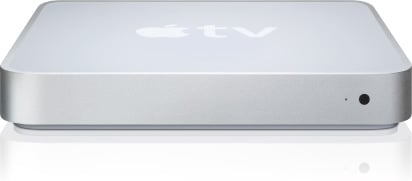
Forrest Research, who seem to be riding that “Apple headline high” that most of these research groups go through from time to time, is back again telling us all how much of a failure the AppleTV is.
They have number estimates, and blah, blah, blah…
Does this “research group” crap get under your skin as much as it does mine? These companies take small surveys of select groups of people and then do the math to spread them out and basically make numbers up. I understand this may have been a great way to do things in the 1950s, but can we please get with the new millennium here?
Surveying 250, or even 2,500 people for a survey on a tech product these days is just plain stupid. It’s stupid when these companies say something is a success, and it’s stupid when they say something is a failure.
You want to do a survey?
Survey the readers of the NY Times, survey the readers of Engadget, survey the readers of Reader’s Digest, and then survey the readers of Cat Fancy. Mix all that into one big pot, THEN give me some numbers. Don’t stand out on a street corner, survey 20 people and then tell me that you know anything about market penetration or brand awareness. This archaic way of doing things is exactly how popular and successful shows (take Family Guy and Futurama for example) get cancelled. The Nielsens is a perfect example of how this system is completely out of date, and worthy of ridicule and shame.
(for those of you that are thinking of crying fanboy - please keep reading…thanks)
via [applegazette]
Monday, December 10, 2007
VoIP Coming to iPod Touch
An iPod Touch developer has just created a SIP-based VoIP app (which works with Asterisk and other open source free and paid VoIP providers) that was ported from an older app called SvSIP. The upside is that iPod Touch users that have the pre-amped mic addon that plugs into the dock connector will be able to actually talk on their iPods. iPhone users won't need the addon to talk (obviously), and should be able to get in on this action soon as well. [gizmodo]

Tuesday, October 23, 2007
Apple Mac Mini
Price :Apple Mac Mini (1.83GHz Intel Core 2 Duo) prices from 17 stores.
At $599, the 1.83GHz Intel Core 2 Duo-based Apple Mac Mini is the least expensive Apple computer you can buy today. You'd be hard-pressed to find a Windows system this stylish and this small. If you're truly unconcerned with performance and instead aspire toward simply an attractive, untethered workspace, the baseline Mac Mini will deliver. For $599, however, you can find much faster, smaller Windows desktops. The Mac Mini includes wireless-networking features that you won't find in more expensive Windows desktops, but aside from that and looking pretty, there's not much this system can do that a Windows PC of the same price can't do better.
features of mac mini

Wednesday, October 17, 2007
Tuffshield : Sheer protection from scratches and dust for Apple Gadget
Price : $14.95
Crystal Clear screen and click wheel protection
3 protectors + cleaning cloth
Sheer protection from scratches and dust
TuffShield™ screen and click wheel protectors are built to withstand the rigors of everyday iPod or iPhone use.

| | ||
| TuffShields combine a state-of-the-art H3 hard coating, with PET polymers and a micro-thin silicone layer, to create the best sheer protection from scratches and dirt. Each TuffShield package contains three films custom-cut for the intended device and a microfiber cleaning cloth for use on the films and the entire iPod.
| | |

Monday, October 15, 2007
Stylish Samsung SCX-4500 and ML-1630 Printer
The Samsung SCX-4500 Multi-function Laser Printer sells for $299.95 and the ML-1630 Laser printer sells for $199.95. Apple has a $100 rebate when you buy a printer with a new Mac, that also applies to the new Samsung printers.
The Samsung SCX-4500 multi-function printer features a high-gloss piano-black finish and unique sapphire blue LED scan-process indicator. Button-less sensors make for easy selection of functions. The Samsung-exclusive "No-Noise" technology means quiet operation at 45 dB or less.
CNET Review :

The good: Sleek, sophisticated design; great print and color scan quality.
The bad: Light feature set for the price; grayscale scan needs to be improved; on the slow side with task speeds; output tray mars the all-black aesthetic; lack of an onboard LCD means you'll need to turn to your PC for advanced tasks.
The bottom line: Long on design and short on features, the Samsung SCX-4500 multifunction laser printer is best suited for light home or office use. Unless you're willing to pay for a showcase printer (two words we've never seen next to one another), your money will buy you more features and faster task speeds elsewhere.
you can see it the video here
Features :
| It's sleek |
 |
| One look at the exquisite design and the high gloss finish and you know that this is unlike any printer you've ever encountered before ? and you've only just seen the surface. The design is pure luxury, elegantly crafted in a sleek, compact body embedded with Sapphire LED's. |
| It's slim |
 |
| No more space consuming printer. This downsize printer does not compensate the capacity nor its design. It's more portable and no more worries of bulky and bulging desktops but a slimmer and more beautiful desktop that makes your desk a pleasant and spacious area even more. |
| It's simple |
 |
| By just slightly tapping on the button, it will operate your printer with the functionality that will auto run your printer without extra force in application |
more information : via CNET and Samsung
Subscribe to:
Posts (Atom)


